To manage and Invite Users to your AIQBee tenant, you can navigate to Setup at the top of the page and then select Users in the left-hand menu.
When loading the Users page you will be show a list of your tenants' users, including their name, email, associated Organisation, Role and Status.
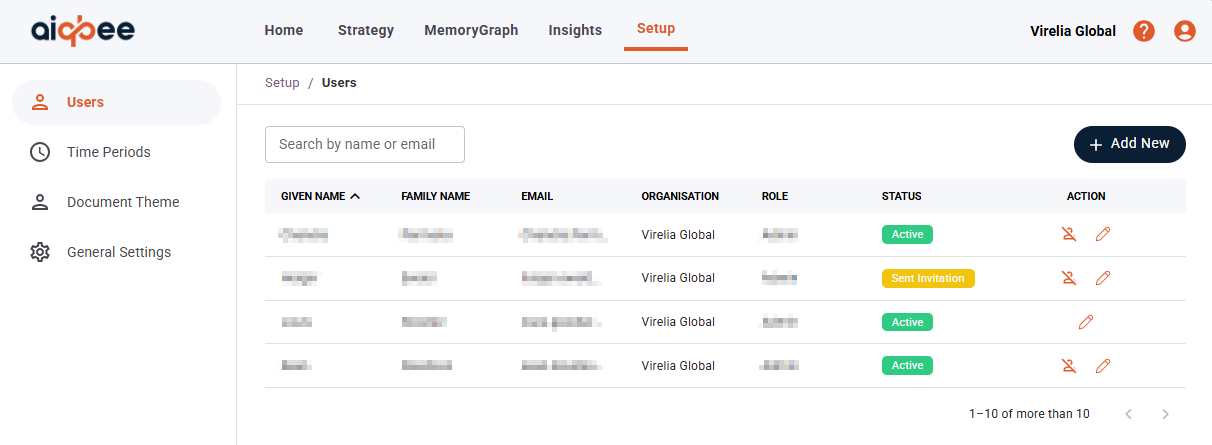
To disable access, select the icon of a person with a line through it. To enable select the icon of the person.
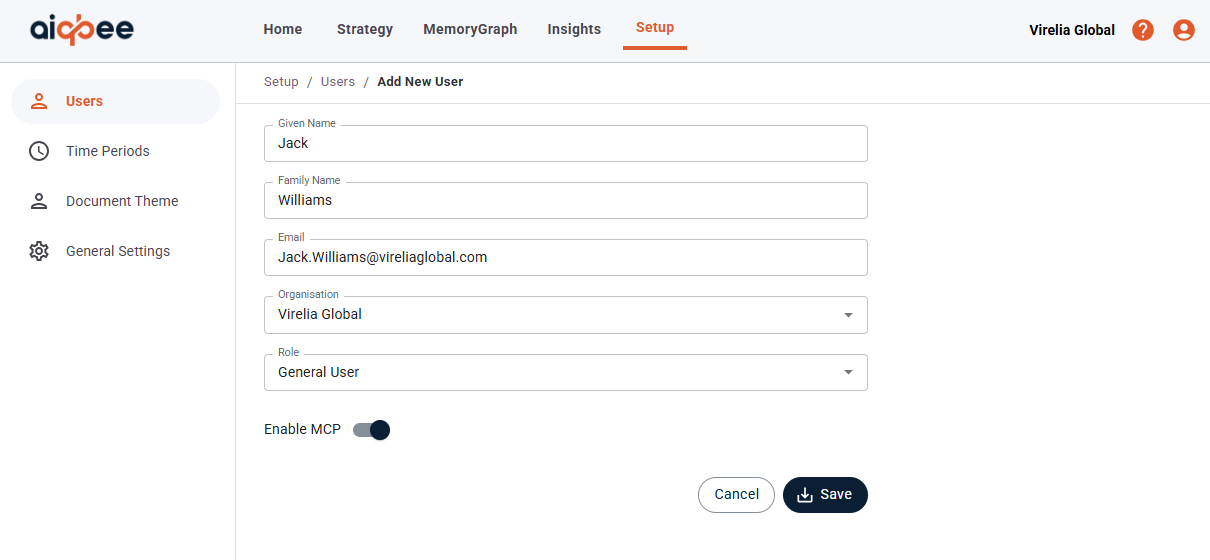
To add new users, select the + Add New and fill out the form or edit a User by selecting the pencil icon next to the user's name.
You will need to provide, or update the following:
- Given Name or first name
- Family Name or surname
- Email that is not in use by another AIQBee tenant
- Organisation that the user primarily belongs too
- Role indicating the permissions and access the user should have
- Enable MCP (available for subscription types where this functionality is enabled)
If the user is already in use, you will receive an error message like below. If this happens, please use an alternative email, or contact support by submitting a ticket at the top of this page to request a transfer of this user to your tenant.

Was this article helpful?
That’s Great!
Thank you for your feedback
Sorry! We couldn't be helpful
Thank you for your feedback
Feedback sent
We appreciate your effort and will try to fix the article